
Message JS Eval
A downloadable mod
Description
Allows you to evaluate inline JavaScript inside RPG Maker MV/MZ Show Text or Show Choices command. You can place JavaScript inside <JS>...</JS> tags in Show Text and Show Choices, and the result will be inserted directly into the displayed text at runtime.
This is useful for dynamically showing actor data, party data, conditional text, calculations, variable values, and/or other information without needing extra event commands, "temporary" switches, variables, or script calls.
Features
- Evaluates JavaScript inline using
<JS>...</JS>tags - Works in Show Text and Show Choices
- Displays a fallback error message if a JS block fails
- Logs JS block errors to the console for debugging
- Great way to learn JavaScript!
Screenshots
Don't do it this way anymore!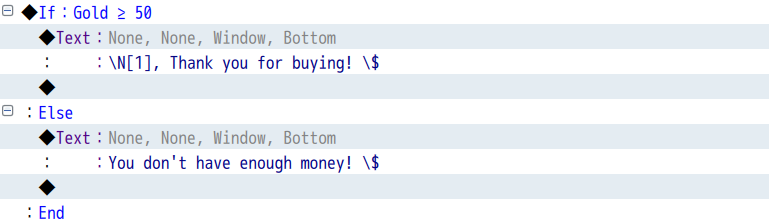
Just do it in one line:
Imagine you want to show a message depending on whether a door switch is ON or OFF.
With default RPG Maker: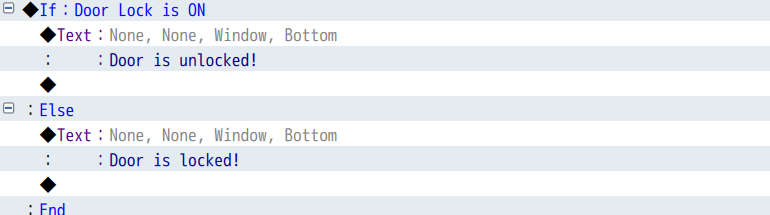
With plugin:

How to Use
- Drop the plugin into your project’s js/plugins/ folder
- Load it through the Plugin Manager
- Use <JS>...</JS> anywhere inside Show Text or Show Choices
Example
You have <JS>$gameParty.gold()</JS> Gold.
This will display the party’s current gold.
You can also use conditional expressions:
Door has been <JS>$gameSwitches.value(10) ? "unlocked" : "locked"</JS>
Or actor data:
Hello \N[1], your current HP is: <JS>$gameActors.actor(1).hp</JS>
Basically any JavaScript you want!
You can also use this inside Show Choices event command.
Example (Show Choices event command):
Merchant: "This will cost you \v[35] Gold."
Pay \v[35] GoldTry and haggle for <JS> $gameVariables.value(35) / 2 </JS> GoldNevermind.
NOTE (Regarding Escape Codes Inside JS):
If your JavaScript returns RPG Maker escape codes such as \N[1], \V[10], and similar backslash-based message codes, you MUST escape the backslash inside the JavaScript string.
Use double backslashes:
JavaScript:
<JS>$gameActors.actor(1).hpRate() <= 0.3 ? "\\N[1], you need to heal!" : ""</JS>
Do not use a single backslash (this is wrong  ):
):
JavaScript:
<JS>$gameActors.actor(1).hpRate() <= 0.3 ? "\N[1], you need to heal!" : ""</JS>
This is required because the contents of <JS>...</JS> are parsed as JavaScript first, before RPG Maker processes its usual message escape codes.
Plugin Commands
There are no plugin commands in this plugin.
Compatibility
- Works well on the MZ engine.
- Works well with VisuStella plugins (Message Core, etc.)
- Has not been tested with other plugins
- Has not been tested on MV, but I see no compatibility issues
Download
See attached file.
AI Disclaimer
This plugin was created by me without the use of AI tools. I am using it in my own game to make life easier for myself. AI was only used to write documentation and JS Doc comments.
FAQ
Q: Can I use this in Show Text?
A: Yes.
Q: Can I use this in Show Choices?
A: Yes.
Q: Can I write full JavaScript statements inside <JS>...</JS>?
A: Yes, but keep in mind the block is evaluated directly at runtime. Only use trusted code.
Q: Why am I seeing [Error in JS block]?
A: Your JavaScript inside the <JS>...</JS> block threw an error. Open the console to see the exact error log.
Q: Why is \N[1] or \V[10] not working inside my JS block?
A: Because JavaScript processes the string first. You must escape the backslash, for example "\\N[1]" instead of "\N[1]".
Credits
punitdh89
Terms of Use
Free for personal and commercial use.
Attribution optional but appreciated.
Download
Click download now to get access to the following files:

Leave a comment
Log in with itch.io to leave a comment.